Dark Mode
FlowFuse now has a dark mode. 🦇 You can switch the whole app between Light, Dark, and System from your User Settings.
A bright white UI is fatiguing in low-light control rooms or on a night shift. Dark mode lets FlowFuse fit those environments.
By default, FlowFuse follows your operating system and flips live when it changes. Pick Light or Dark to lock it in, FlowFuse remembers your choice per browser.
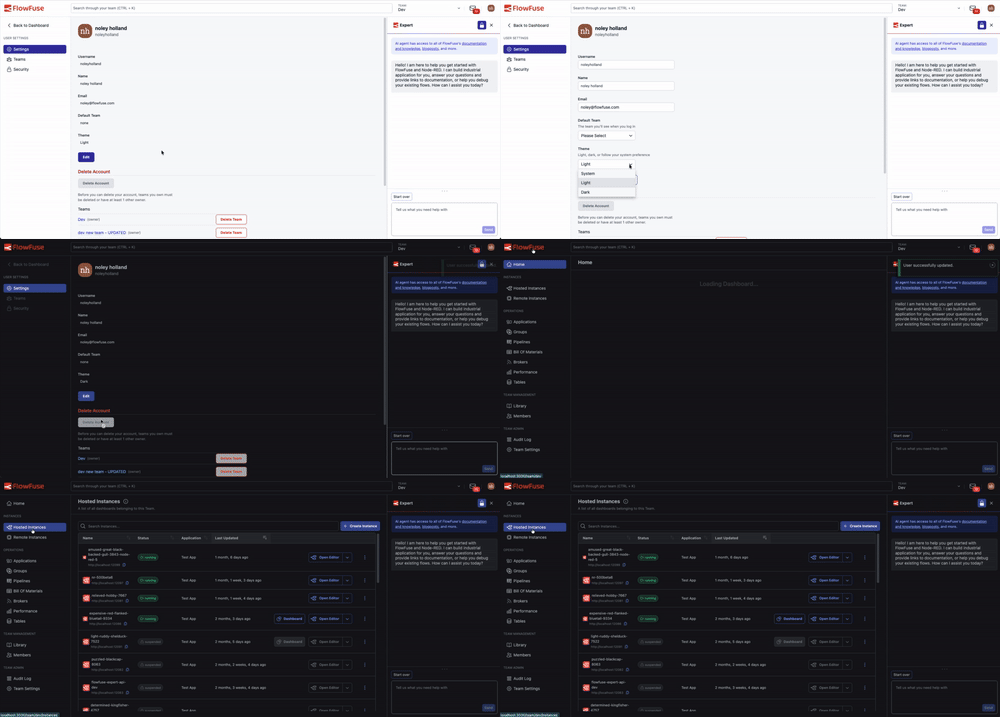 The whole app re-themes live as you toggle, no reload needed.
To change your theme:
- Open User Settings
- Under Theme, choose Light, Dark, or System
- Save
A note on scope: dark mode covers the FlowFuse application itself. The embedded Node-RED editor and Dashboard iframes keep their own themes, Node-RED and your Dashboard configuration manage those separately.
This feature is available to all FlowFuse Cloud users and all Self-Hosted users from v2.32.
Written By:
Published on:
Related GitHub Issues
Recent Updates:
- Getting started with FlowFuse straight from the terminal
- FlowFuse Expert Can Now Work With Your Tables
- A Dedicated Home for Your Dashboards
- Application Roles from SSO Groups
- FlowFuse Expert Enhancements